
XS 0.8
TROUBLESHOOTING
The charger doesn’t turn ON when connected to the mains
- Try a different outlet.
- Disconnect any extension cables and connect the charger directly to an outlet. For UK-plugs: Check the fuse and replace, if necessary (same size).
If the issue persists, it is likely the charger has developed a fault.
For warranty inquiries, please contact your retailer to initiate a replacement claim.
If there are further issues, contact us for further support.
Charger is connected to a battery, but it’s stuck in power saving mode
The power indicator flashes during energy saving mode = no battery is connected, or the battery is too discharged (less than 2V).
- Check that the clamps are connected properly to the recommended charging points.
- Check the quick connector by disconnecting it and make sure the pins look good. Connect again and confirm proper contact.
- If you have additional accessories, switch between them and compare results.
- If possible, try the charger on a different battery in good condition.
If the issue persists, it is likely the charger has developed a fault.
For warranty inquiries, please contact your retailer to initiate a replacement claim.
DISPLAY EXPLANATION
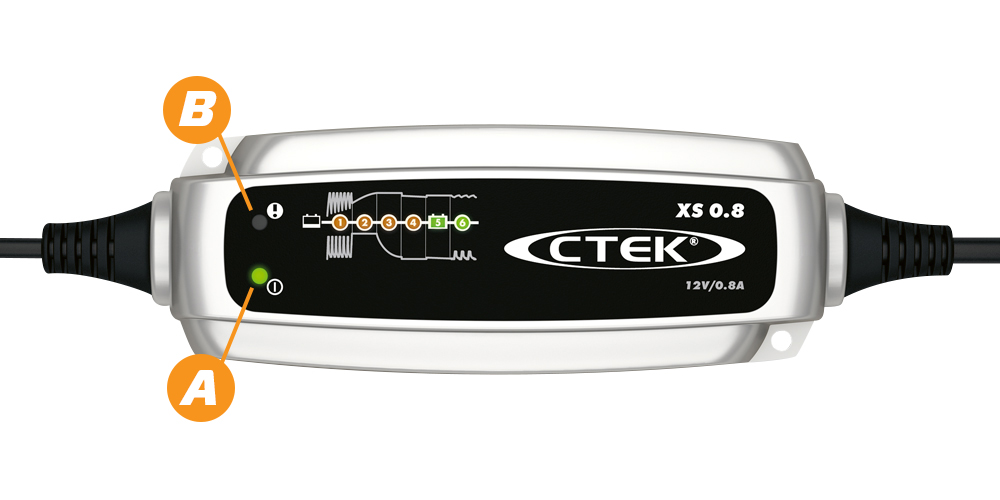
Power indicator ( A ) is lit steadily. This indicates that the mains cable is connected to the wall socket.
The power indicator flashes during energy saving mode = no battery is connected, or the battery is too discharged (less than 2V).
Error indicator ( B ). Indicates that the charger is incorrectly connected to the battery.
Error indicator ( B ) + Charging (1) + Charging (1-4) indicates that there might be too many consumers active whilst charging, or a poor battery.
Charging indicator (1,2,3,4,5,6). Indicates which stage the charger is in during the charging process.
Fully charged (5 ,6 ).
When (5) is lit, battery is accepted as good and you can leave the charger unattended for a longer period.
MXS 3.8
TROUBLESHOOTING
The charger doesn’t turn ON when connected to the mains.
- Try a different outlet.
- Disconnect any extension cables and connect the charger directly to an outlet. For UK-plugs: Check the fuse and replace, if necessary (same size).
If the issue persists, it is likely the charger has developed a fault.
For warranty inquiries, please contact your retailer to initiate a replacement claim.
If there are further issues, contact us for further support.
The MODE button doesn’t work.
Connect the charger to the mains and power it on. Then try pressing the button a bit firmer and repeat it a few times. If the issue persists, the button is most likely defective. However, please keep in mind that the charger will still work in the selected mode.
For warranty inquiries, please contact your retailer to initiate a replacement claim.
If there are further issues, contact us for further support.
Charger is connected to a battery, but it’s stuck in power saving mode.
If the power indicator flashes during energy saving mode = no battery is connected, or the battery is too discharged (less than 2V).
- First, check that the clamps are connected properly to the recommended charging points.
- Then check the quick connector by disconnecting it and make sure the pins look good.
- Connect again and confirm proper contact.
- If you have additional accessories, switch between them and compare results.
- If possible, try the charger on a different battery in good condition.
If the issue persists, it is likely the charger has developed a fault.
For warranty inquiries, please contact your retailer to initiate a replacement claim.
DISPLAY EXPLANATION
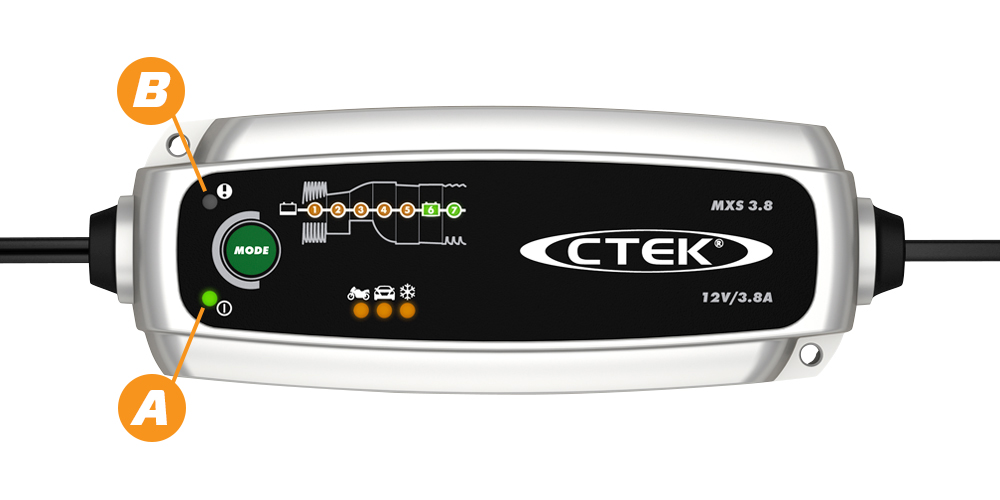
Power indicator ( A ) is lit steadily. This indicates that the mains cable is connected to the wall socket.
The power indicator flashes during energy saving mode = no battery is connected, or the battery is too discharged (less than 2V)
Error indicator ( B ). Indicates that the charger is incorrectly connected to the battery.
Error indicator ( B )+ Charging (1,2)/ Charging (1-5) indicates that there might be too many consumers active whilst charging, or a poor battery.
Charging indicator (1,2,3,4,5,6,7). Indicates which stage the charger is in during the charging process.
Fully charged ( 6,7 ).
When (6) is lit, battery is accepted as good, and you can leave the charger unattended for a longer period of time
MXS 5.0
TROUBLESHOOTING
The charger doesn’t turn ON when connected to mains.
Try a different outlet and disconnect any extension cables and connect the charger directly to an outlet. For UK-plugs: Check the fuse and replace, if necessary (same size).
If the issue persists, it is likely the charger has developed a fault.
For warranty inquiries, please contact your retailer to initiate a replacement claim.
If there are further issues, contact us for further support.
The MODE button doesn’t work.
Connect the charger to the mains and then try pressing the button a bit firmer and repeat it a few times. If the issue persists, the button is most likely defective. However, please keep in mind that the charger will still work in the selected mode.
For warranty inquiries, please contact your retailer to initiate a replacement claim.
If there are further issues, contact us for further support.
The charger is connected to a battery, but it’s stuck in power saving mode.
If the power indicator flashes during energy saving mode, it means that no battery is connected, or the battery is too discharged (less than 2V). So you need to:
- First check that the clamps are connected properly to the recommended charging points.
- Then check the quick connector by disconnecting it and make sure the pins look good. Connect again and confirm proper contact.
- If you have additional accessories, switch between them and compare results.
- If possible, try the charger on a different battery that is in a good condition.
If the issue persists, it is likely the charger has developed a fault.
For warranty inquiries, please contact your retailer to initiate a replacement claim.
DISPLAY EXPLANATION
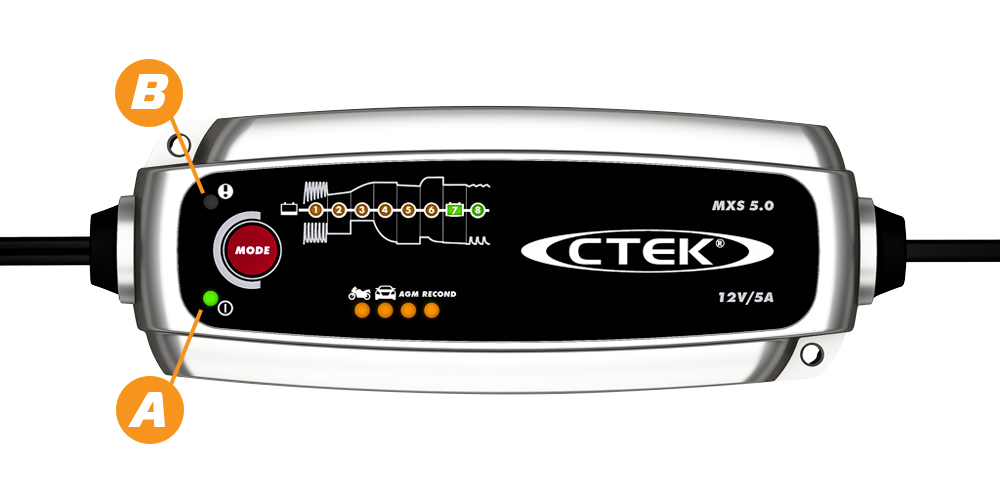
Power indicator ( A ) is lit steadily. Indicates that the mains cable is connected to the wall socket.
The power indicator ( A ) flashes during energy saving mode = no battery is connected, or battery too discharged (less than 2V)
Error indicator ( B ). Indicates that the charger is incorrectly connected to the battery.
Error indicator ( B )+ Charging (1,2)/ Charging (1-5) indicates that there might be too many consumers active whilst charging, or a poor battery.
Charging indicator (1,2,3,4,5,6,7,8) indicates which stage the charger is in during the charging process.
Fully charged ( 7,8 ).
When (7) is lit, battery is accepted as good and you can leave the charger unattended for a longer period of time
MXS 5.0 POLAR
TROUBLESHOOTING
The charger doesn’t turn ON when connected to mains.
Try a different outlet and disconnect any extension cables and connect the charger directly to an outlet. For UK-plugs: Check the fuse and replace, if necessary (same size).
If the issue persists, it is likely the charger has developed a fault.
For warranty inquiries, please contact your retailer to initiate a replacement claim.
If there are further issues, contact us for further support.
The MODE button doesn’t work.
Connect the charger to the mains and try pressing the button a bit firmer and repeat it a few times. If the issue persists, the button is most likely defective. However, please keep in mind that the charger will still work in the selected mode.
For warranty inquiries, please contact your retailer to initiate a replacement claim.
If there are further issues, contact us for further support.
The charger is connected to a battery, but it’s stuck in power saving mode.
The power indicator flashes during energy saving mode which means that no battery is connected, or the battery is too discharged (less than 2V).
- First check that the clamps are connected properly to the recommended charging points.
- Then check the quick connector by disconnecting it and make sure the pins look good. Connect again and confirm proper contact.
- If you have additional accessories, switch between them and compare results.
- If possible, try the charger on a different battery in good condition.
If the issue persists, it is likely the charger has developed a fault.
For warranty inquiries, please contact your retailer to initiate a replacement claim.
DISPLAY EXPLANATION
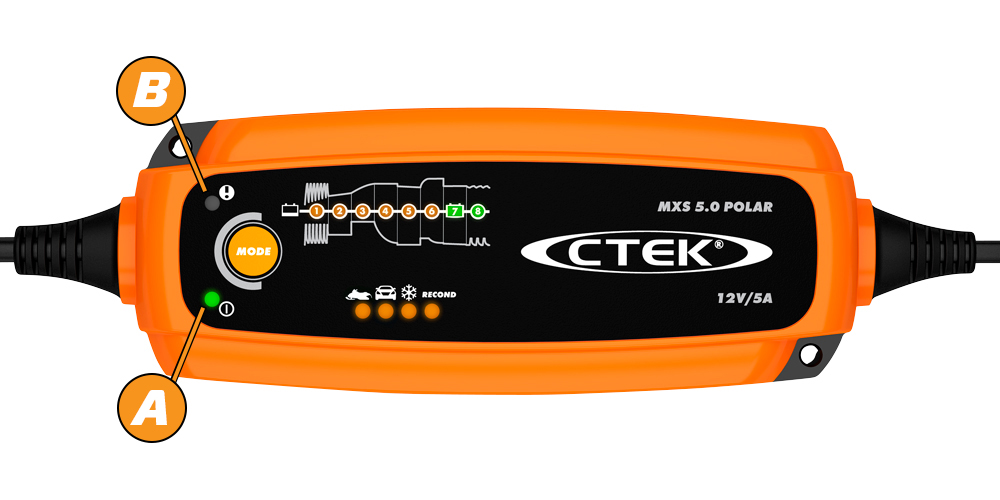
Power indicator ( A ) is lit steadily. Indicates that the mains cable is connected to the wall socket.
The power indicator ( A ) flashes during energy saving mode = no battery is connected, or battery too discharged (less than 2V)
Error indicator ( B ). Indicates that the charger is incorrectly connected to the battery.
Error indicator ( B )+ Charging (1,2)/ Charging (1-5) indicates that there might be too many consumers active whilst charging, or a poor battery.
Charging indicator (1,2,3,4,5,6,7,8) Indicates which stage the charger is in during the charging process.
Fully charged ( 7,8 ).
When (7) is lit, battery is accepted as good and you can leave the charger unattended for a longer period of time
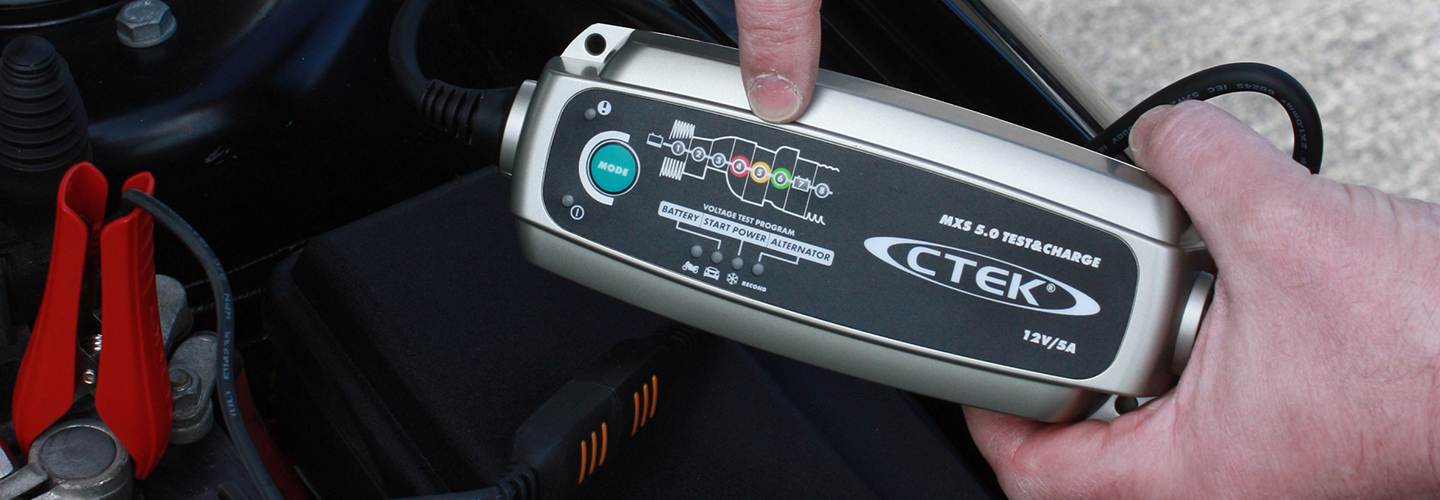
MXS 5.0 TEST & CHARGE

TROUBLESHOOTING
The charger doesn’t turn ON when connected to the mains.
Try a different outlet, and disconnect any extension cables and connect the charger directly to an outlet. For UK-plugs: Check the fuse and replace, if necessary (same size).
If the issue persists, it is likely the charger has developed a fault.
For warranty inquiries, please contact your retailer to initiate a replacement claim.
If there are further issues, contact us for further support.
The MODE button doesn’t work.
Connect the charger mains and try pressing the button a bit firmer and repeat it a few times. If the issue persists, the button is most likely defective. However, please keep in mind that the charger will still work in the selected mode.
For warranty inquiries, please contact your retailer to initiate a replacement claim.
If there are further issues, contact us for further support.
Charger is connected to a battery but it’s stuck in power saving mode.
The power lamp flashes during energy saving mode which means that no battery is connected, or the battery too discharged (less than 2V).
- Check that the clamps are connected properly to the recommended charging points.
- Check the quick connector by disconnecting it and make sure the pins look good. Connect again and confirm proper contact.
- If you have additional accessories, switch between them and compare results.
- If possible, try the charger on a different battery that is in good condition.
If the issue persists, it is likely the charger has developed a fault.
For warranty inquiries, please contact your retailer to initiate a replacement claim.
DISPLAY EXPLANATION
Power indicator ( A ) is lit steadily. Indicates that the mains cable is connected to the wall socket.
The power indicator ( A ) flashes during energy saving mode = no battery is connected, or battery too discharged (less than 2V)
Error indicator ( B ). Indicates that the charger is incorrectly connected to the battery.
Error indicator ( B )+ Charging (1,2)/ Charging (1-5) indicates that there might be too many consumers active whilst charging, or a poor battery.
Charging indicator (1,2,3,4,5,6,7,8) Indicates which stage the charger is in during the charging process.
Fully charged ( 7,8 ).
When (7) is lit, battery is accepted as good and you can leave the charger unattended for a longer period of time.
TESTING - NOT CONNECTED TO THE MAINS
Indicators shows the result of the test ( 4: Bad | 5: Fair | 6: OK ).
TESTING PROGRAMS:
BATTERY - Reveals a battery’s current charge level.
START POWER - Monitors a battery’s output during the strain of engine cranking, to evaluate overall condition.
ALTERNATOR - Establishes whether a vehicle’s charging system is correctly charging the battery or not.
LITHIUM XS
TROUBLESHOOTING
The charger doesn’t turn ON when connected to the mains.
Try a different outlet, and disconnect any extension cables and connect the charger directly to an outlet. For UK-plugs: Check the fuse, and replace if necessary (same size).
If the issue persists, it is likely the charger has developed a fault.
For warranty inquiries, please contact your retailer to initiate a replacement claim.
If there are further issues, contact us for further support.
The RESET button doesn’t work.
Connect the charger to the mains, and try pressing the button a bit firmer and repeat it a couple times. If the issue persists, the button is most likely defective. However, keep in mind that the charger will still work in the selected mode.
For warranty inquiries, please contact your retailer to initiate a replacement claim.
If there are further issues, contact us for further support.
Charger is connected to a battery but it’s stuck in power saving mode.
The power lamp flashes during energy saving mode which means that no battery is connected, or the battery on board UVP (Under Voltage Protection) is activated.
- Check that the clamps are connected properly to the recommended charging points.
- Check the quick connector by disconnecting it and make sure the pins look good. Connect again and confirm proper contact.
- If you have additional accessories, switch between them and compare results.
- Press the RESET button for 10 seconds to open the UVP. (Step 7 is lit during this process).
- If possible, try the charger on a different known good battery.
If the issue persists, it is likely the charger has developed a fault.
For warranty inquiries, please contact your retailer to initiate a replacement claim.
DISPLAY EXPLANATION
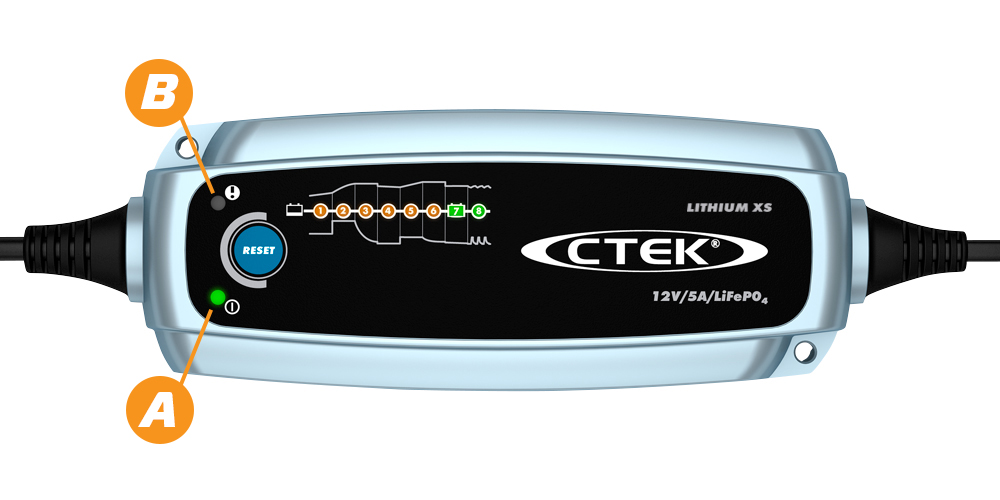
Power indicator ( A ) is lit steadily. Indicates that the mains cable is connected to the wall socket.
The power indicator ( A ) flashes during energy saving mode = no battery is connected, or battery gone into power saving mode (UVP).
Error indicator ( B ). Indicates that the charger is incorrectly connected to the battery.
Error indicator ( B )+ Charging (1,2)/ Charging (1-5) indicates that there are too many consumers active whilst charging, or a poor battery.
Charging indicator (1,2,3,4,5,6,7,8) Indicates which stage the charger is in during the charging process.
Fully charged ( 7,8 ).
When (7) is lit, battery is accepted as good, and you can leave the charger unattended for a longer period of time
RESET – Press for 10 seconds to WAKE UP a battery closed-down due to UVP. – During RESET, LED ( 7 ) will be lit.
MXS 7.0

TROUBLESHOOTING
The charger doesn’t turn ON when connected to the mains.
Try a different outlet, and disconnect any extension cables and connect the charger directly to an outlet. For UK-plugs: Check the fuse and replace, if necessary (same size).
If the issue persists, it is likely the charger has developed a fault.
For warranty inquiries, please contact your retailer to initiate a replacement claim.
If there are further issues, contact us for further support.
The MODE button doesn’t work.
Connect the charger to the mains, and try pressing the button a bit firmer and repeat it a few times. If the issue persists, the button is most likely defective. However, please keep in mind that the charger will still work in the selected mode.
For warranty inquiries, please contact your retailer to initiate a replacement claim.
If there are further issues, contact us for further support.
Charger is connected to a battery, but it’s stuck in power saving mode.
The power indicator flashes during energy saving mode which means no battery is connected, or the battery on board UVP (Under Voltage Protection) is activated.
- Check that the clamps are connected properly to the recommended charging points.
- Check the quick connector by disconnecting it and make sure the pins look good. Connect again and confirm proper contact.
- If you have additional accessories, switch between them and compare results.
- Press the RESET button for 10 seconds to open the UVP. (Step 7 is lit during this process).
- If possible, try the charger on a different battery in good condition.
If the issue persists, it is likely the charger has developed a fault.
For warranty inquiries, please contact your retailer to initiate a replacement claim.
DISPLAY EXPLANATION
Power indicator ( A ) is lit steadily. This indicates that the mains cable is connected to the wall socket.
The power indicator ( A ) flashes during energy saving mode = no battery is connected, or the battery is too discharged (less than 2V)
Error indicator ( B ) +( 1 ) + ( 2, 3, 4 ) . Indicates that the charger is incorrectly connected to the battery it also indicates that there might be too many consumers active whilst charging, or a poor battery.
Charging indicator ( 1, 2, 3, 4 ). Indicates which stage the charger is in during the charging process.
Fully charged. When ( 4 ) is lit, the battery is accepted as good and you can leave the charger unattended for a longer period of time.
MXS 10
TROUBLESHOOTING
The charger doesn’t turn ON when connected to the mains
Try a different outlet, and disconnect any extension cables and connect the charger directly to an outlet. For UK-plugs: Check the fuse and replace, if necessary (same size).
If the issue persists, it is likely the charger has developed a fault.
For warranty inquiries, please contact your retailer to initiate a replacement claim.
If there are further issues, contact us for further support.
The MODE button doesn’t work
Connect the charger to the mains, and try pressing the button a bit firmer and repeat it a few times. If the issue persists, the button is most likely defective. However, please keep in mind that the charger will still work in the selected mode.
For warranty inquiries, please contact your retailer to initiate a replacement claim.
If there are further issues, contact us for further support.
Charger is connected to a battery, but it’s stuck in power saving mode
The power lamp flashes during energy saving mode means no battery is connected, or battery too discharged (less than 2V).
- Check that the clamps are connected properly to the recommended charging points.
- Check the quick connector by disconnecting it and make sure the pins look good. Connect again and confirm proper contact.
- If you have additional accessories, switch between them and compare results.
- If possible, try the charger on a different known good battery.
If the issue persists, it is likely the charger has developed a fault.
For warranty inquiries, please contact your retailer to initiate a replacement claim.
DISPLAY EXPLANATION
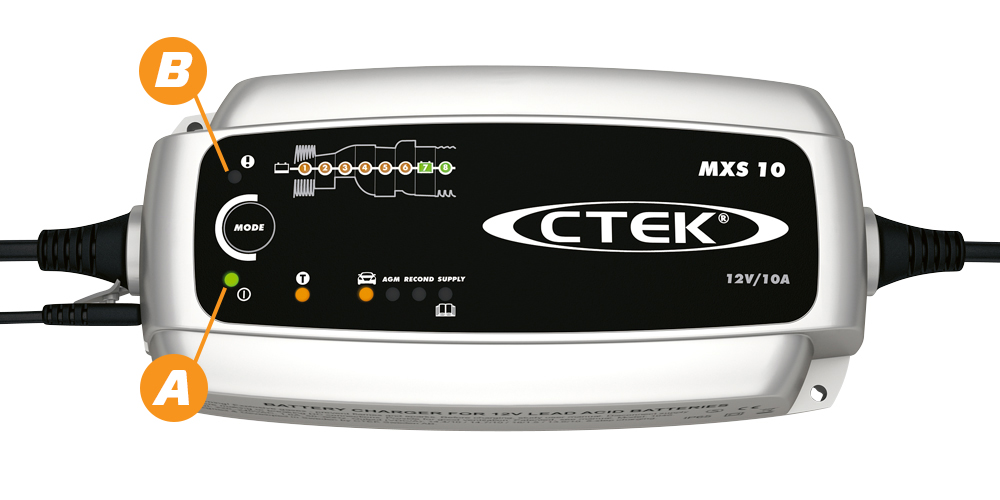
Power indicator ( A ) is lit steadily. This indicates that the mains cable is connected to the wall socket.
The power indicator ( A ) flashes during energy saving mode = no battery is connected, or the battery too discharged (less than 2V).
Error indicator ( B ). Indicates that the charger is incorrectly connected to the battery.
Error indicator ( B )+ Charging (1,2)/ Charging (1-5) indicates that there might be too many consumers active whilst charging, or a poor battery.
Charging indicator (1,2,3,4,5,6,7,8) Indicates which stage the charger is in during the charging process.
Fully charged ( 7,8 ).
When (7) is lit, the battery is accepted as good, and you can leave the charger unattended for a longer period of time